I’ve got Netbird running on 8 devices, from Pi Zero thru Windows desktops to a janky Truenas server. With a few hiccups (knocking one remote device offline during the update) I managed to update from 5.9.4 to 5.9.5 on all my devices. I see there is now a 5.9.6 update but for the life of me I cannot remember how I updated the Truenas. Could a kind soul point me in the right direction?
Depends on how you setup the app, I know you can get a custom app with a yml in truenas. Try somewhere it mentions “Custom Applications”, and see if you can edit it’s yml file regarding Netbird. And have it update to the next version you need.
Thanks for the response Codixer. I installed it as a custom app, (as per the instructions on the Netbird YT channel) so I can see the YAML config. Honestly not sure what to edit to do this. What does make me scratch my head is I did manage to do this for the last update from 0.5.9.4 to 0.5.9.5 from a command line, just wish I could remember how I did it.
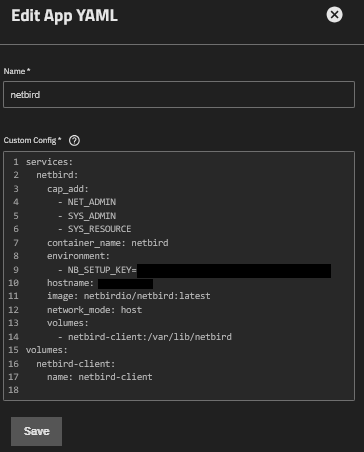
Couldn’t remember how I did it, deleted the app in Truenas, reinstalled with new key. Ugly, brutish, it worked with a terrible new human readable URL. 
That looks like a docker compose config @Dis.
I’m assuming (never used a Truenas) that you’re just running the netbird client as a docker container which is fairly common.
See where it says image: netbirdio/netbird:latest? Every time you pull the image, it’ll update - maybe there’s a way in Truenas to just pull the new docker image and restart the app rather than recreating it every time there’s an update?
Thanks for the reply, colocated. Yes, it is a docker container. I ended up deleting the app, renaming my Truenas, re-installing the docker app, and it gave me back my original neat URL. I’ll have to research the docker system more, what gets me is I’m sure I just used command line to update it previously ( ie an apt upgrade) but now that command isn’t available in the container. I did get a message when playing about with possible solutions that indicated it was updated by a package manager. I’ll figure it out before the next point upgrade of Netbird. 
Figured this out. In the Apps menu, stop the Netbird app, use the Configuration menu, Manage Container Images, put netbirdio/netbird:latest in the search box, click the Pull Image button, add netbirdio/netbird:latest as the image name. First time it generates a new entry, so you might have to delete the unnamed image. Next time you have the named/tagged image and that pulls the latest image. Stumbling my way thru Docker configuration