Describe the problem
I self-hosted NetBird using quick Zitadel as the identity provider, following the documented setup with:
if [ "$NETBIRD_DOMAIN" == "use-ip" ]; then NETBIRD_DOMAIN=$(get_main_ip_address). for local test in my VMs.
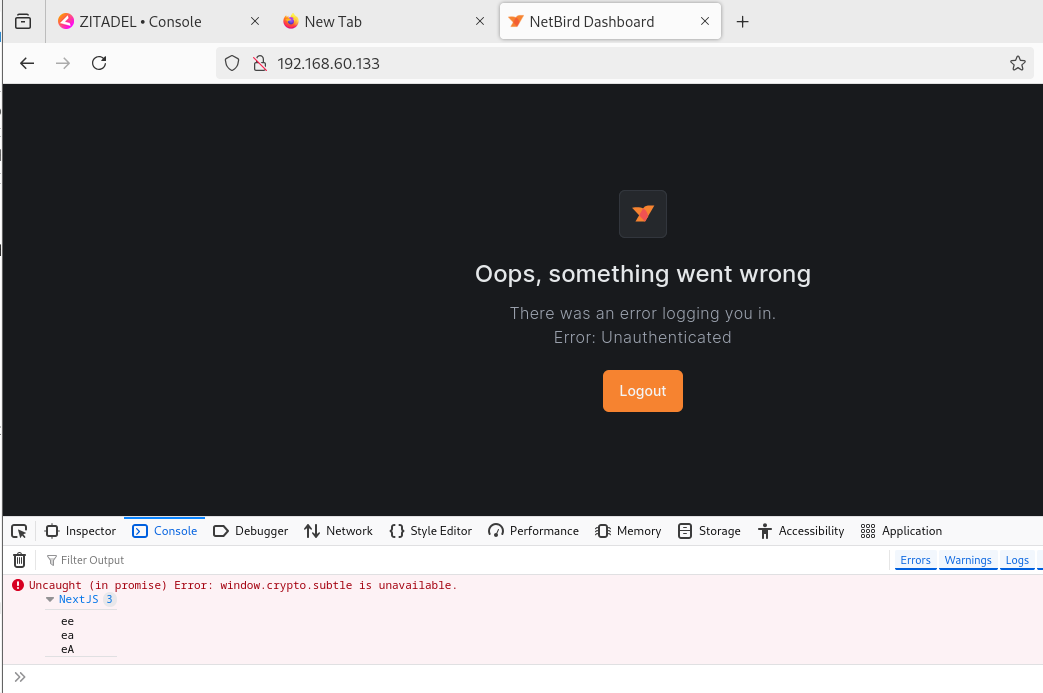
The setup completes without any errors, and the dashboard becomes accessible via http://192.168.60.133. However, when I try to log in, I encounter an authentication failure without login.
Oops, something went wrong There was an error logging you in. Error: Unauthenticated
Additionally, the browser console logs:
Uncaught (in promise) Error: window.crypto.subtle is unavailable.
To Reproduce
Steps to reproduce the behavior:
- Deploy NetBird with quick Zitadel setup with “use-ip” (HTTP only, no TLS).
- Open the dashboard via
http://192.168.60.133. - See “Unauthenticated” error and JavaScript console error.
Expected behavior
Login screen that I can log in with credentials in the output.
Are you using NetBird Cloud?
No, self-hosted NetBird with Zitadel.
NetBird version
0.49.0
Debug output
All containers work properly without no errors or warnings.
Screenshots
Additional context
Also, in configure.sh for manual setup, there is a section that says local development
if [[ $NETBIRD_DOMAIN == "localhost" || $NETBIRD_DOMAIN == "127.0.0.1" ]]; then
  export NETBIRD_MGMT_SINGLE_ACCOUNT_MODE_DOMAIN="netbird.selfhosted"
  export NETBIRD_MGMT_API_ENDPOINT=http://$NETBIRD_DOMAIN:$NETBIRD_MGMT_API_PORT
  unset NETBIRD_MGMT_API_CERT_FILE
  unset NETBIRD_MGMT_API_CERT_KEY_FILE
fi
do you know how I can setup with this when using keycloak for idp?
Have you tried these troubleshooting steps?
- Searched for similar issues on GitHub (including closed ones)
- Disabled other VPN software
- Checked firewall settings