I’m getting the following warning:
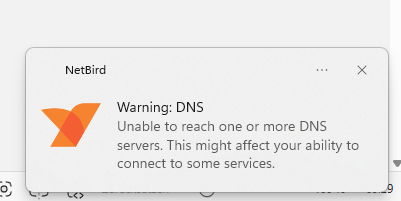
I’ve a Adguard Home running in a LXC on my TrueNAS that I added as a DNS-Server to my Self-Hosted-Netbird.
Do I have to use the Netbird, or the IP of the Adguard-LXC under Netbird?
Is it right, that I can’t ping the netbird-clients from the self hosted netbird-server?
Peers detail:
truenas.netbird.selfhosted:
NetBird IP: 100.87.8.39
…
Latency: 14.8248ms
office-server.netbird.selfhosted:
NetBird IP: 100.87.58.40
…
Latency: 1.0083ms
lx-netbird.netbird.selfhosted:
NetBird IP: 100.87.232.142
…
Latency: 15.7962ms
…
Events:
[WARNING] DNS (a7axxxxx-xxxx-xxxx-xxxx-xxxxxxxxxxx)
Message: All upstream servers failed (probe failed)
Time: 4 hours, 43 minutes ago
Metadata: upstreams: 100.87.63.114:53, 192.168.13.30:53
[INFO] SYSTEM (ce6xxxxx-xxxx-xxxx-xxxx-xxxxxxxxxxx)
Message: Network map updated
Time: 4 hours, 43 minutes ago
[WARNING] DNS (0156xxxxx-xxxx-xxxx-xxxx-xxxxxxxxxxx)
Message: All upstream servers failed (fail count exceeded)
Time: 4 hours, 26 minutes ago
Metadata: upstreams: 100.87.63.114:53, 192.168.13.30:53
[WARNING] DNS (bcbfxxxxx-xxxx-xxxx-xxxx-xxxxxxxxxxx)
Message: All upstream servers failed (fail count exceeded)
Time: 4 hours, 18 minutes ago
Metadata: upstreams: 100.87.63.114:53, 192.168.13.30:53
[WARNING] DNS (d3c4xxxxx-xxxx-xxxx-xxxx-xxxxxxxxxxx)
Message: All upstream servers failed (fail count exceeded)
Time: 4 hours, 2 minutes ago
Metadata: upstreams: 100.87.63.114:53, 192.168.13.30:53
[WARNING] DNS (fcf56xxxxx-xxxx-xxxx-xxxx-xxxxxxxxxxx)
Message: All upstream servers failed (fail count exceeded)
Time: 3 hours, 35 minutes ago
Metadata: upstreams: 100.87.63.114:53, 192.168.13.30:53
[INFO] SYSTEM (b3e5xxxxx-xxxx-xxxx-xxxx-xxxxxxxxxxx)
Message: Network map updated
Time: 3 hours, 21 minutes ago
[INFO] SYSTEM (aa83xxxxx-xxxx-xxxx-xxxx-xxxxxxxxxxx)
Message: Network map updated
Time: 3 hours, 21 minutes ago
[INFO] SYSTEM (1abbxxxxx-xxxx-xxxx-xxxx-xxxxxxxxxxx)
Message: Network map updated
Time: 3 hours, 17 minutes ago
OS: windows/amd64
Daemon version: 0.55.1
CLI version: 0.55.1
Profile: default
Management: Connected to https://netbird.mydomain.com:443
Signal: Connected to https://netbird.mydomain.com:443
Relays:
[stun:netbird.mydomain.com:3478] is Available
[turn:netbird.mydomain.com:3478?transport=udp] is Available
[rels://netbird.mydomain.com:443] is Available
Nameservers:
[100.87.63.114:53, 192.168.13.30:53] for [.] is Available
FQDN: office-pc.netbird.selfhosted
NetBird IP: 100.87.147.162/16
Interface type: Userspace
Quantum resistance: false
Lazy connection: true
Networks: -
Forwarding rules: 0
Peers count: 3/3 Connected
I don’t run LXC/TrueNAS, so I can’t help you there. I did follow this video @ around 17:33 he sets up his pi-hole which is AGH for all intents and purposes.
I got that up and running initially, but since I also have a Network Route opening my LAN to netbird, it was easier to avoid the netbird IP in my nameserver config, and instead point to my router running AGH directly via 192.168.1.1 and port 53.
That might be a solution that is helpful or at least gives you a rough outline? What has helped me a lot admittedly was talking to Claude/ChatGPT after explaining my setup with plenty of detail, including the first few rows of my adguardhome.yaml
Assuming you had been using the DNS IP address from Netbird, yes this error is intentional. Netbird follows the “Connect to DNS then Network then retry DNS”, it’s a bit wonky and the devs are aware of it.