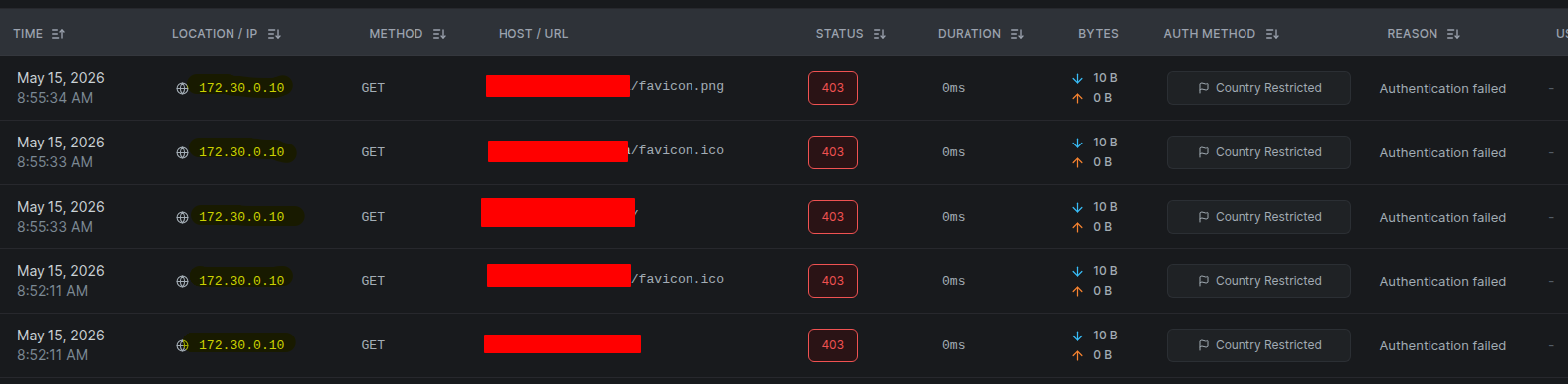
I installed netbird pre 0.65 combined container setup. Did the migration activated the proxy and busy testing the reverse proxy feature. Looks very promising. Netbird itself works amazingly well, so we have no complaints there. The only issue i am having is. I am trying to setup country blocking or any IP filtering on the reverse proxy but it keeps reporting the netbird proxy docker IP instead of the external IP of the incoming connection.
So it blocks the connection because its country restricted. How do i get it to pick up the correct IP address. I am using the integrated traefik and combined docker setup.
To Reproduce
Steps to reproduce the behavior:
Configure the reverse proxy.
Access an exposed service.
Proxy Events shows internal 172.30.0.10 IP. Seems to be the docker network.
Expected behavior
External IP address to be reported and country blocking/IP Filtering then work.
Are you using NetBird Cloud?
Self Hosted
NetBird version
Latest as of today.
Management: v0.71.0
Dashboard : v2.38.0
Is any other VPN software installed?
None
Debug output
No Debug. VPN works Only reporting back the incorrect IP Address.
I had a similair issue, trafeak isn’t properly sending the IP address to Netbird. Still trying to figure out on my end why this is happening and I think it has to do with the headers/any real-ip plugins.
I have the same issue with me on my end. I am hosting Authentik proxied through Netbird but at some point in the Auth flow it uses the Docker internal gateway and because i have geoblock enabled it blocks the route and breaks the auth flow