Hi NetBird team, community members,
I’ve been trying to set up a self-hosted NetBird deployment using Keycloak as the OIDC provider with Github as an identity provider. The dashboard login via Github works fine, but the /peers page never finishes loading. I have gone back to the initial setup from the documentation: Advanced guide - NetBird Docs.
Here’s the setup I’m using:
- Self-hosted using the official Docker compose setup (latest version 0.59.7) & Ubuntu 24.04 LTS
- Keycloak realm configured with netbird-client and netbird-backend clients, and Github as an IdP
- Environment variables follow the standard docker-compose template from configure.sh
- No reverse proxy is used — everything is exposed directly via the dashboard and management containers on a single IP/domain.
Symptoms:
- Login works, GitHub SSO completes successfully
- /peers keeps loading indefinitely
I’ve spent ~2 months(weekends) debugging this. I’ve checked:
- Docker container network connectivity
- Keycloak client scopes, audience, and token types
- Environment variables in dashboard and management containers
- Firewall / VPN conflicts (none exist)
- NetBird client troubleshooting steps and documentation
Despite all of this, the /peers page still does not load. Upon rebuilding everything from documentation I hit the same screen, different error. I can provide anonymized debug logs and status output if needed.
I’m hoping you can help identify whether there’s a configuration step I’m missing for self-hosted deployments with Keycloak & Github SSO, or if this is a known issue with latest version Docker images. The infrastructure_files/artifacts combined with setup.env and documentation is not clear enough and misses steps in order to complete the self-hosted deployment. Initially I followed only the steps from documentation but never got it working. I would very much love to get this working and use it for my infrastructure. After achieving a working setup I would be able to implement it into my Github workflow or Ansible playbook for further deployments/updates.
I can also share my anonymized /infrastructure_files/artifacts/docker-compose.yml if that would be useful.
Anonymized /infrastructure_files/setup.env that I use:
NETBIRD_DOMAIN="vpn.mydomain.io"

NETBIRD_TURN_DOMAIN=""

NETBIRD_TURN_EXTERNAL_IP=""

NETBIRD_AUTH_OIDC_CONFIGURATION_ENDPOINT="https://auth.mydomain.io/realms/netbird/.well-known/openid-configuration"

#NETBIRD_DASH_AUTH_USE_AUDIENCE=false
NETBIRD_AUTH_AUDIENCE="netbird-client"
NETBIRD_AUTH_CLIENT_ID="netbird-client"
NETBIRD_AUTH_SUPPORTED_SCOPES="openid profile email offline_access api"

NETBIRD_USE_AUTH0="false"
NETBIRD_AUTH_DEVICE_AUTH_PROVIDER="none"
NETBIRD_AUTH_DEVICE_AUTH_CLIENT_ID="netbird-client"
NETBIRD_AUTH_DEVICE_AUTH_AUDIENCE=$NETBIRD_AUTH_AUDIENCE
NETBIRD_AUTH_DEVICE_AUTH_SCOPE="openid"
NETBIRD_AUTH_DEVICE_AUTH_USE_ID_TOKEN=false


NETBIRD_MGMT_IDP="keycloak"
NETBIRD_IDP_MGMT_CLIENT_ID="netbird-backend"
NETBIRD_IDP_MGMT_CLIENT_SECRET="my-netbird-backend-secret"
NETBIRD_IDP_MGMT_EXTRA_ADMIN_ENDPOINT="https://auth.mydomain.io/admin/realms/netbird"


NETBIRD_DISABLE_LETSENCRYPT=false

NETBIRD_LETSENCRYPT_EMAIL="admin@mydomain.io"

NETBIRD_DISABLE_ANONYMOUS_METRICS=false
NETBIRD_MGMT_DNS_DOMAIN=netbird.selfhosted
NETBIRD_MGMT_DISABLE_DEFAULT_POLICY=false
I have checked all the Keycloak settings from Identity Providers - NetBird Docs and rebuild the directory from the Github repository (latest version).
I am completely at a loss about how this should be set up. If I follow the official documentation I always run into this screen that keeps loading /peers
Update:
I found a setting I did miss but now still stumble upon this error:
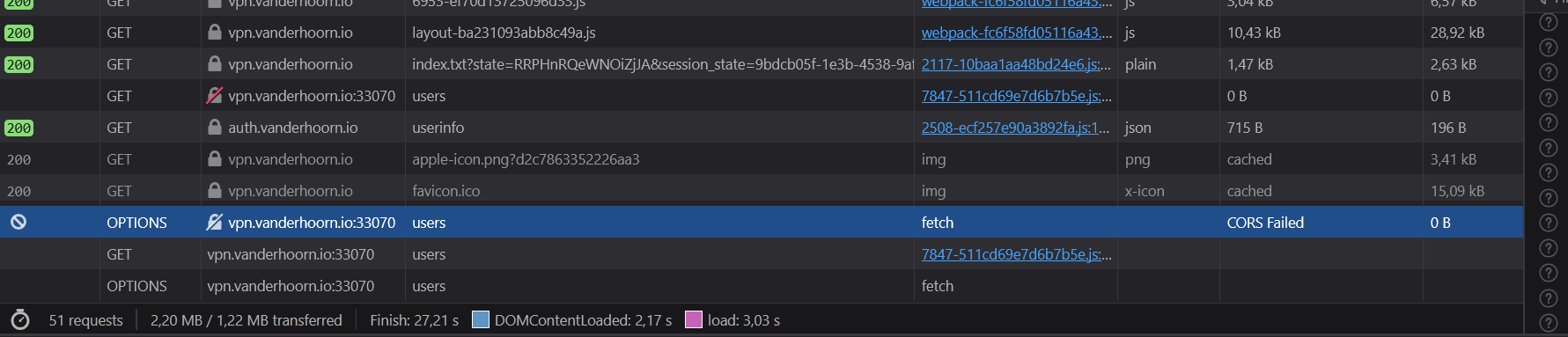
I seem to have an issue with CORS? Where/how would I fix this?
Thanks (I hope) for your assistance!