Describe the problem
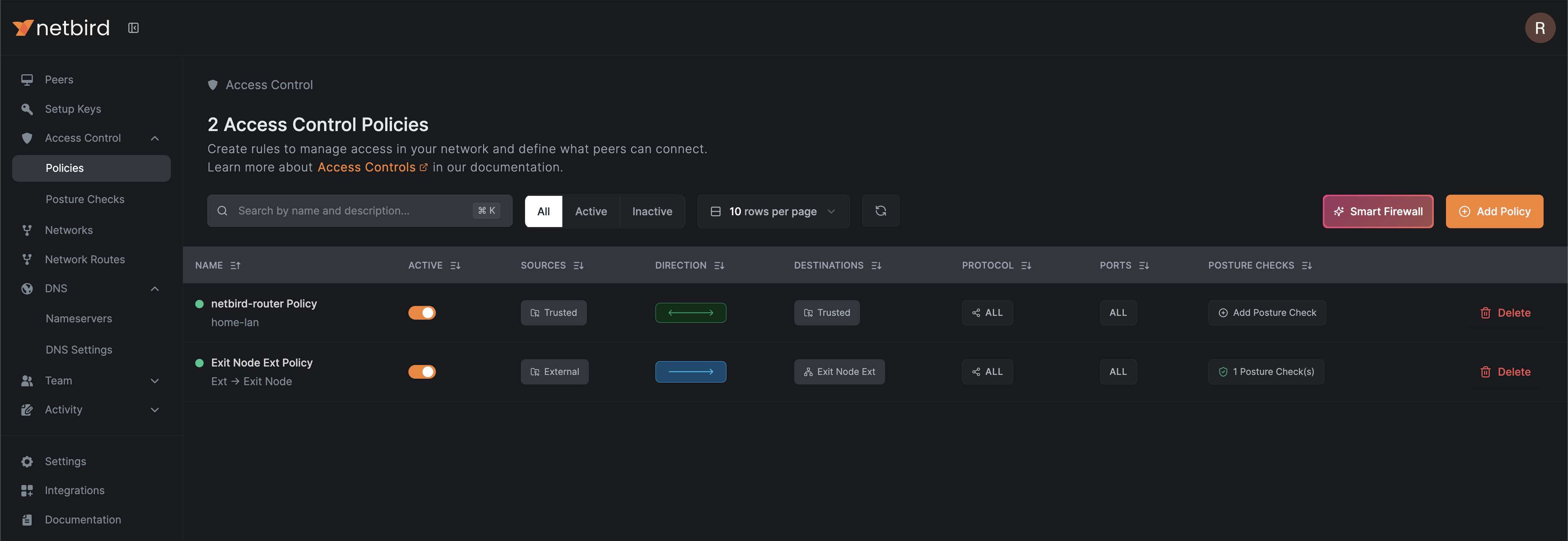
I have a homelab setup where I’ve deployed Proxmox and created two Linux Containers (LXC). My goal is to use one LXC to publish my home network subnet (192.168.68.0/22 - TP-Link’s default) and the second LXC I intend to configure as an exit node for external users and devices that are not part of the trusted network (i.e., my homelab and known devices). I want the second LXC to be completely isolated from the rest of the trusted network and devices.
After configuring everything, I can see the correct exit node on one of the external devices. However, I’m still able to ping and access the trusted devices, despite having set up the access control lists (ACLs) and policies to completely separate the two groups.
I have not yet purchased physical equipment, such as a managed switch, to divide my home network into VLANs and create physically separate networks. How can I achieve a similar result using Netbird?
Are you using NetBird Cloud?
Self-hosted NetBird’s control plane.
NetBird version
0.55.1
Is any other VPN software installed?
Tailscale - LXC stopped and not running
Screenshots:
Have you tried these troubleshooting steps?
- Reviewed client troubleshooting (if applicable)
- Checked for newer NetBird versions
- Searched for similar issues on GitHub (including closed ones)
- Restarted the NetBird client
- Disabled other VPN software
- Checked firewall settings