Describe the problem
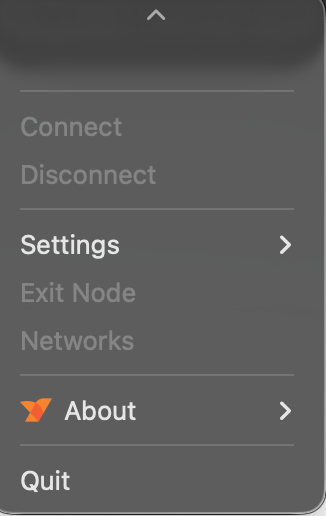
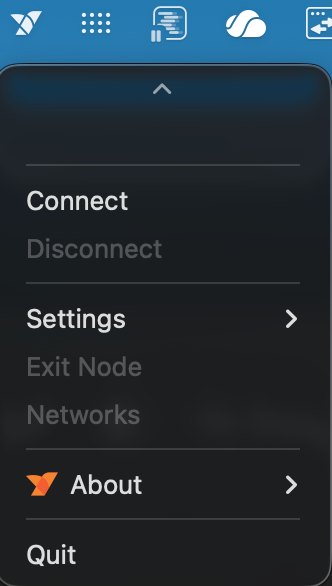
When I start Netbird on my Mac I can see no profiles and cannot connect (as due to the UI issue probably no profile is selected)
As soon as I download netbird (the same version) and install it. It works again as expected.
To Reproduce
Steps to reproduce the behavior:
- Open Netbird via CMD+Space and type ‘netbird’
- No Profile visible.
Expected behavior
The profiles should be available without a reinstall of Netbird.
Are you using NetBird Cloud?
Two profiles are hosted and one is selfhosted. The issue was already there were only 2 profiles.
NetBird version
v0.63.0 but the problem is several versions old.
Is any other VPN software installed?
No
Debug output
To help us resolve the problem, please attach the following anonymized status output
netbird status -dA
Create and upload a debug bundle, and share the returned file key:
netbird debug for 1m -AS -U
Uploaded files are automatically deleted after 30 days.
Alternatively, create the file only and attach it here manually:
netbird debug for 1m -AS
Screenshots
If applicable, add screenshots to help explain your problem.
Additional context
The problem is clearly a UI Problem. Unfortunately I do not know if it has something to do with my Macbook Pro M4 (v. 26.2) or with Netbird itself. On my windows machines I have never had any issues.
Have you tried these troubleshooting steps?
- Reviewed client troubleshooting (if applicable)
- Checked for newer NetBird versions
- Searched for similar issues on GitHub (including closed ones)
- Restarted the NetBird client
- Disabled other VPN software
- Checked firewall settings
are you able to reset the smc on your mac, as well as remove netbird including config files for a complete reinstall.
I have tried to remove everything and after several attempts I have managed to delete Netbird including the profiles. Unfortunately after a restart the default profile does not show up anymore so there is still the same issue present.
I tried to do a SMC reset and later read that with an apple silicon mac it is resetting every time a restart is done (Reset the SMC of your Mac - Apple Support).
I still have to “reinstall” netbird to use it.
good intel, did not know smc reset every reboot. can you run ‘netbird reconfigure’ in your terminal. and see what happens afterwards.
Really appreciate the help. Thank you.
‘netbird reconfigure’ is not a known command.
I started fiddling around with the cli a bit and got the following error when trying to list the profiles:
netbird profile list

2026-01-23T21:38:45+01:00 INFO ./caller_not_available:0: 2026/01/23 21:38:45 WARNING: [core] [Channel #1 SubChannel #2] grpc: addrConn.createTransport failed to connect to {Addr: "/var/run/netbird.sock", ServerName: "localhost", Attributes: {"<%!p(networktype.keyType=grpc.internal.transport.networktype)>": "unix" }, }. Err: connection error: desc = "transport: Error while dialing: dial unix /var/run/netbird.sock: connect: no such file or directory"
Unfortunately I am quite new to mac but this seems to me that the UI component cannot connect to the backend and that is why it is failing to show up. My “less than educated guess” would be that it is some kind of permission issue.
I will try to remove it completely again and install netbird via brew. Maybe this can make a difference.
OK, uninstalling and reinstalling with brew seems to work.