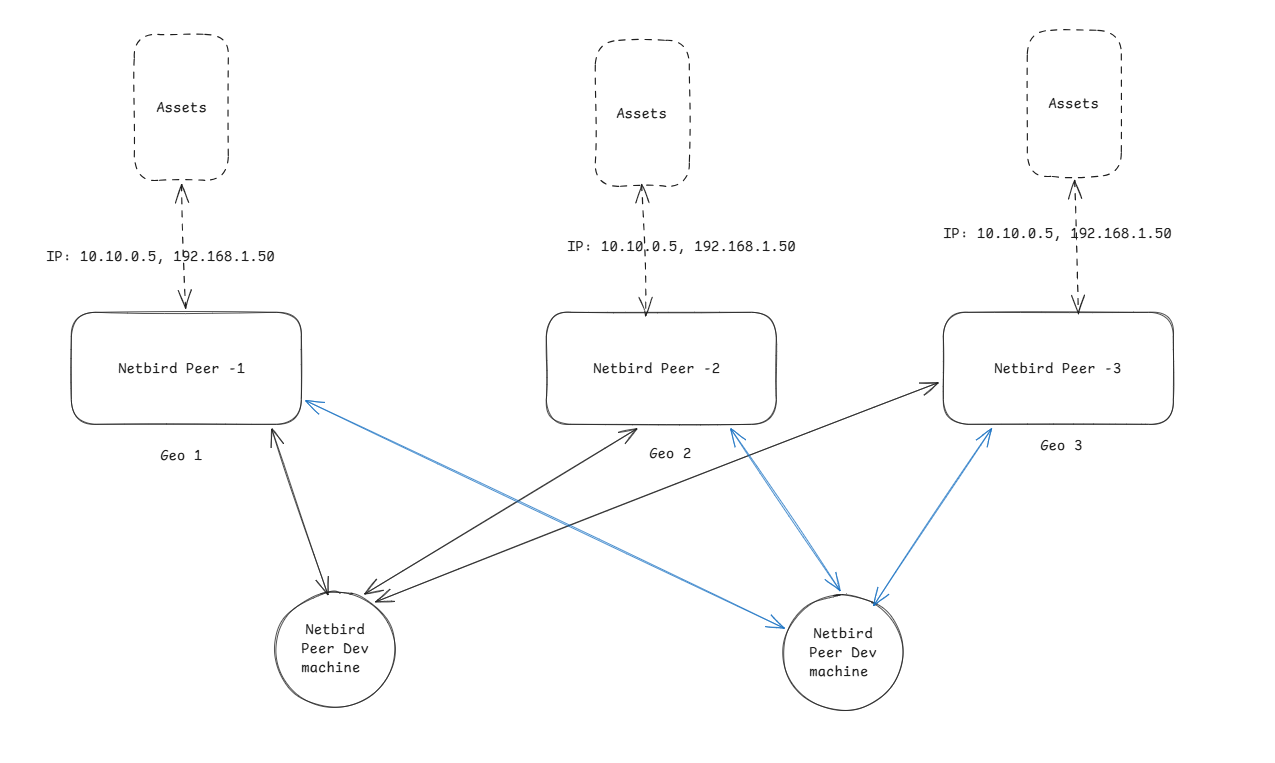
Hello, im experimenting with Netbird for a small company. Here is an example of a scenario where im trying to make network routes properly work.
I have couple of small servers (Netbird peer in 3 geos) which sits in-front of other machines where netbird cannot be enrolled on (IP: 10.10.0.5 and 192.168.1.50). This can be exposed via network route but the problem is that all the assets in 3 different geo is having the same IP address.
This cannot be changed because all 3 different assets have the same domain name associated with it but all 3 of them server different data to us. And the actual clients are embedded devices and i cannot override the domain or IP mapping for them.
We also have dev machines for testing and development which needs to be on specific geo to get the required data.
So the question is how can i make my netbird setup work in this case? so that i should be able to access the asset of only one Geo at the same time but allow other peer access
can this be done using profiles?
Create 2 groups
- developers (all developers peers will’be added to this group)
- cloud (all cloud resources will’be added to this group)
create an policy
source: developers
destination: cloud
protocol: all
if you want ssh create seperate policy for that with same options and protocol: Netbird SSH, SSH Access: Full
This may not be related to the question I have. I need segregated network routes access, and the network routes will have same IPs in all 3 geo
Create three NetBird Networks, each with a Resource using the same overlapping CIDRs but a different routing peer:
| Network |
Routing Peer |
Resources |
geo1-assets |
NetBird Peer-1 |
10.10.0.5/32, 192.168.1.50/32 |
geo2-assets |
NetBird Peer-2 |
10.10.0.5/32, 192.168.1.50/32 |
geo3-assets |
NetBird Peer-3 |
10.10.0.5/32, 192.168.1.50/32 |
Apply an Access Control Policy to each:
On a developers machine with NetBird installed, you can use the client GUI to switch between overlapping networks by clicking Networks - Overlapping networks.
In the CLI, you can use the command netbird networks ls and netbird networks select <ID>
Here is some documentation: Networks - NetBird Docs
@Jack_Carter One more question, currently if I add any networks, all the clients will get this information and by default all the new networks are automatically selected. Can this behaviour be turned off?