New to Netbird. Liking what I see so far. I have a selfhosted instance running, I believe I am using the “combined” Netbird deployment, with Traefik - this is what my Docker containers look like:
I do also have a couple of Authentik ones, I am running in this config, with a “sidecar” Netbird client container, but this isn’t too relevant here.
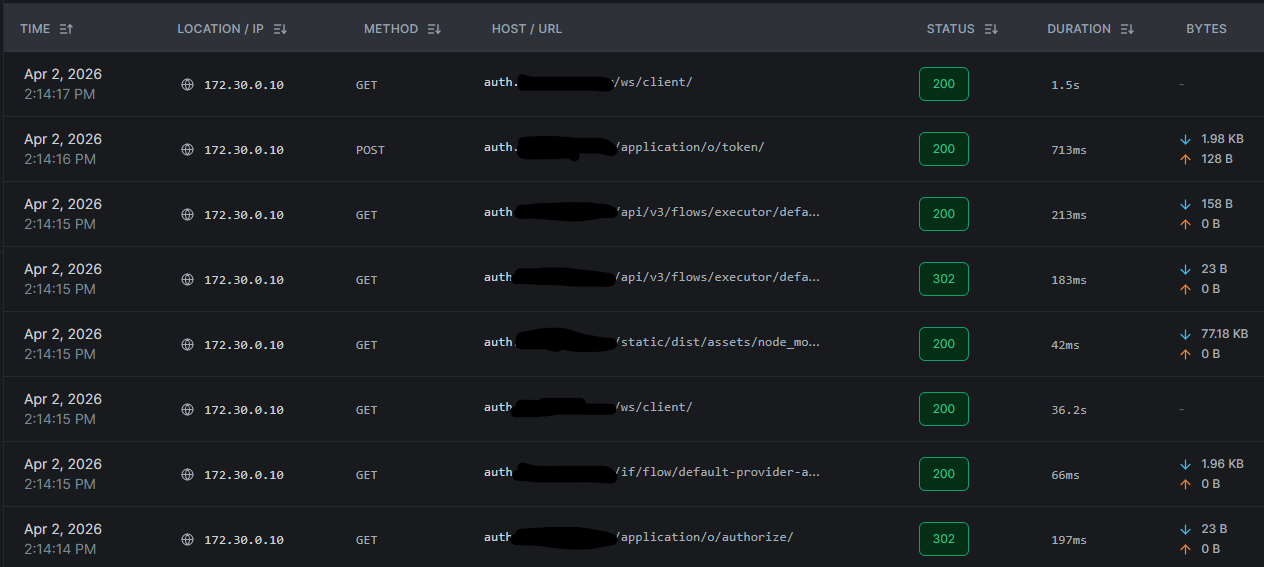
The problem I am having is that when I view the Proxy Logs in Netbird dashboard (Sidebar > Activity > Proxy Events), I see the Docker IP of the Traefix reverse proxy, as the IP address:
These are incoming requests to the Authentik instance behind the Proxy. But, this would apply to anything I choose to expose via Netbird Proxy. I would like to be able to keep an eye on the request logs, including taking a look at the client IP address.
How can I configure the system to log the genuine client public IP, instead of Traefik’s local IP? Is there some solution based on X-Forwarded-For that can be used / added to Netbird?
I have made the config edits and rebooted, (Didn’t update the containers or anything) and as far as I can see, I am still just getting the Traefik IP in the logs. Guessing there is something further I need to do.
The X-Forwarded-For/etc headers normally should be applied or used here. And in most cases even Traefik should’ve already sent over your IP. Alternativly, you could use Plugin
Interesting. I haven’t spent any more time on this on my setup yet, as I have been waiting to get more information. You mention headers, which “should” be applied - Am I right in thinking the Proxy Protocol mentioned in @noses linked Github page should fix this, regardless of headers, as the Proxy Protocol uses a TCP header, not a HTTP header like X-Forwarded-For…?
Also, is Plugin not meant to parse headers on requests to Traefik, E.G when Traefik itself is behind a reverse proxy, whereas here we are trying to make sure Treafik (which IS the “reverse proxy” in this sense) is forwarding that IP information downstream.
I will check the server again, but I though I had already done those steps…
I have made the config edits and rebooted, (Didn’t update the containers or anything) and as far as I can see, I am still just getting the Traefik IP in the logs. Guessing there is something further I need to do.