I might be asking a genuinely dumb question right now, but I’ve set up my self-hosted NetBird instance, and I’m playing around with the permissions. I managed to allow my user account (and all devices under it) to only be able to access certain peers. But my question is, how do I allow users to automatically gain access to peers that are under their accounts? This seems like something All ↔ All would do but I don’t want users to be able to access everything, just their own devices. Is there a way to do this without having to make a policy / group for each user? I’m used to having things like autogroup:self, on Tailscale.
On the other hand, how do I deny users access? E.g., I have a access control policy, All ↔ All. And on top of that, I have an access control policy that allows me to access NetBird SSH to all my servers. However, because of the All ↔ All rule, it allows all my users to access NetBird SSH on my servers. Is there a way to DENY access to specific services or ports, rather than accessing? Since I understand that NetBird is deny-only by default.
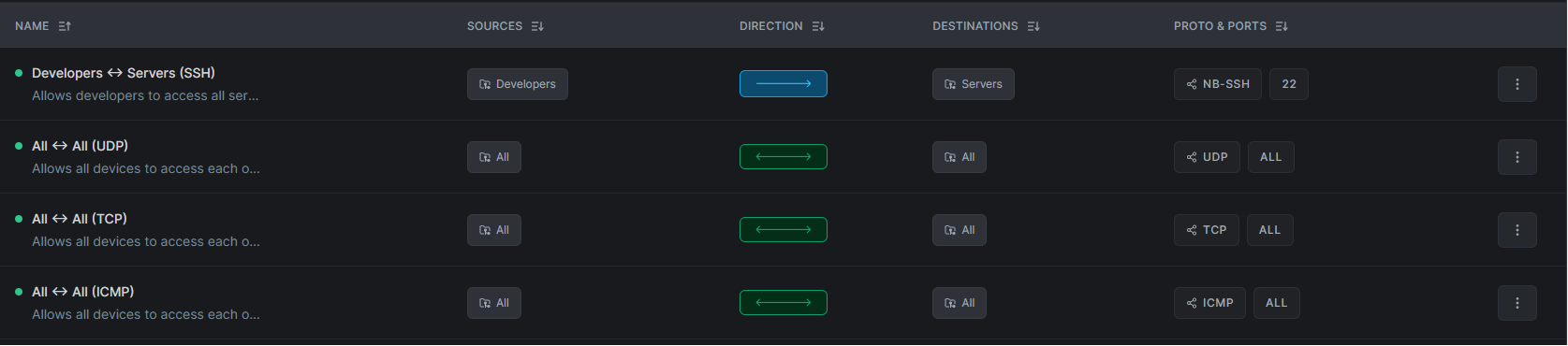
With this specific set of policies, any user is able to gain root access on my server. How do I prevent any normal user, not in the “Developers” group, to NOT be able to access the “Servers” group?
^ I’m sorry if this is a dumb question, I’m stumped right now