Why there is no option to define a certain hostname to resolve to a certain device? All I can see are rules to forward DNS queries. It is probably the most common things to require, so you can access your resources basically, but requires the user to setup its own DNS server/solution?
Am I misunderstanding something basic here?
Yes, Netbird itself only handles the DNS queries for it’s own domain. Or for the domains in a network (Since it requests the DNS from a agent configured inside the network). However, you’d need your own dns server to route requests directly through netbird, as an example.
I have media.home.example.com for example. Any requests to a normal dns server will result in no record being found. But I setup my own dns server ast home in my homelab and tell it the record has 2 ip addresses, the local address and the netbird address. The local address takes priority, but when I’m on netbird. The netbird address takes it if the network featrure breaks. Otherwise, it just ends up on my jellyfin through the network or through the reverse proxy to the network
Hi @Xeravax thanks for the reply.
Yes, that is fine. Yesterday I was playing with it. In am in the latest 0.60.2 and still could not figure out how to setup the access policies, network setup, etc. I am pretty confident it must be a bug, or something is not quite right, but it is not working as expected.
Are you able to define for instance a group multimedia to access jellyfin.home.example.com and plex.home.example.com and nothing else? I use adguard in my router as first DNS resolver. Have a rule for *.home.example.com to go to my server LAN IP. There I have a traefik instance to take care of all those requests. I also have in the same server other resources. It is a simple setup.
I don’t want to share these other resources with certain users. So a basic external user could be part of group multimedia, that is all. Those users should be only allowed to access those 2 endpoints.
And related to the same question, and probably what it triggered me to publish this post in first place, we are adopting Netbird at work, so it is different setup. We have several bare metal servers distributed in 5 colos around the globe. VPN backend is hosted AWS and relays in some of our servers.
We use mainly Cloudflare to resolve DNS. There is no local DNS servers in our current setup. Some of those servers are pointed by public URLs to access some resources I’d like to hide behind the VPN. What would be a recommended way to go here?
Yes, this is possible in one of 2 ways. If you want the easy way, use a network that has DNS for the services that you want access to. This is what I did in mine:
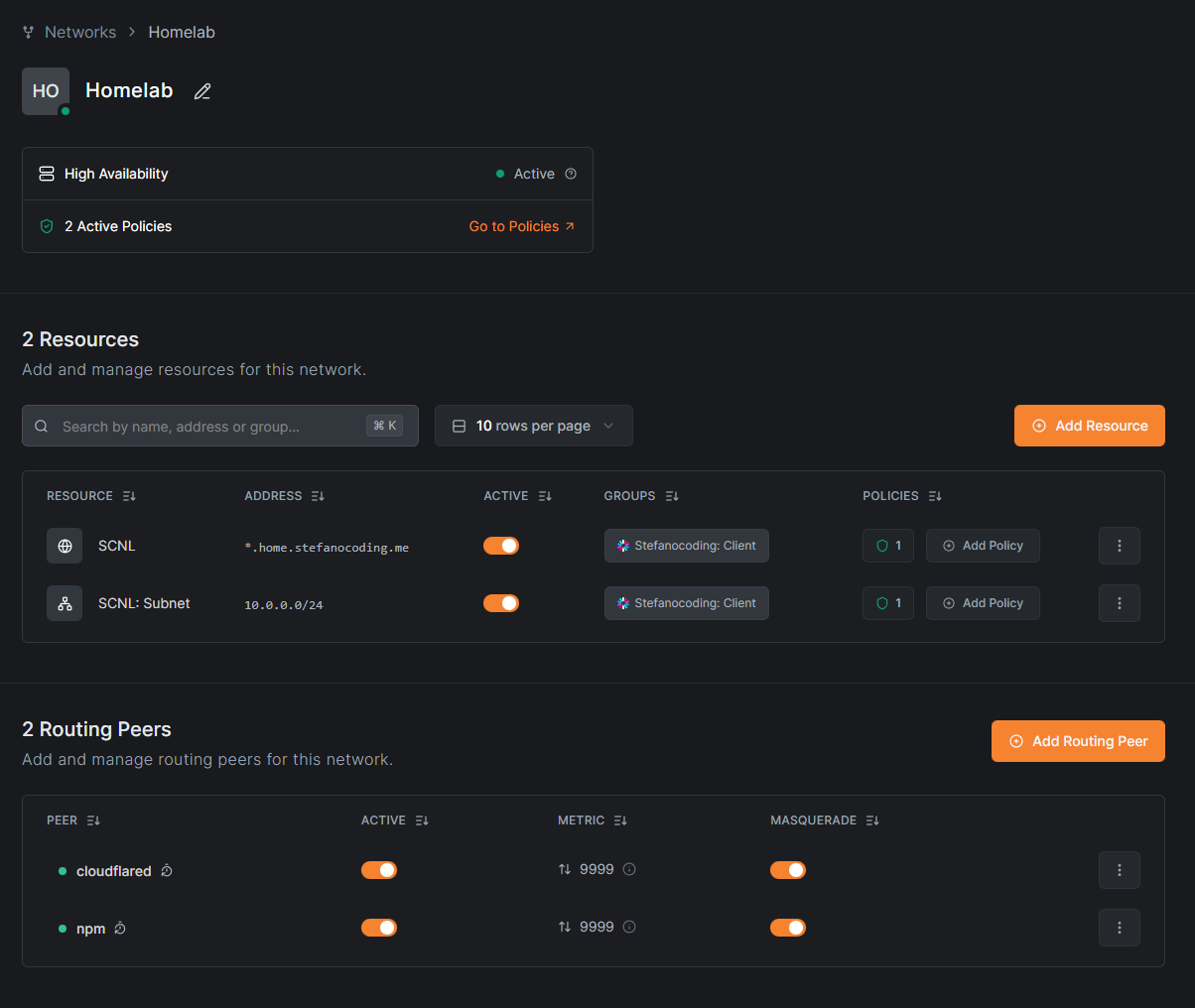
The simple idea here is that I have the entire subnet availible for anyone who has the “Client” group. And they get assigned the access to it. Then for the Subnet itself, so there are rights to enter into the subnet/network in the first place. I haven’t fully figured out the access policies, so it’s on ALL → ALL at the moment until I find a moment to properly debug it.
Alternativly, you can setup an DNS server.

This server would handle all your home domains, for example. If you go to media.home.stefanocoding.me, it’d bring you nowhere. But if you where to connect with Netbird and then the media.home. It’d bring you to the local IP or the netbird IP. (Whatever it can reach, I did both. Because of the debugging with the network above.
For the DNS to work properly. All servers need access to your DNS server, so make a UDP port 53 ALL -> DNS Server for that. Otherwise there is no way servers can even reach the DNS.
After that 2 ways
You make either the entire subnet for the network. Or you open up a legacy network route, giving the entire subnet access.
or
You use the NetBird IP exclusivly, making it so you HAVE to be connected to Netbird to reach the servers/media things in question.
Oh yeah, quite easy. Just define the distribution group
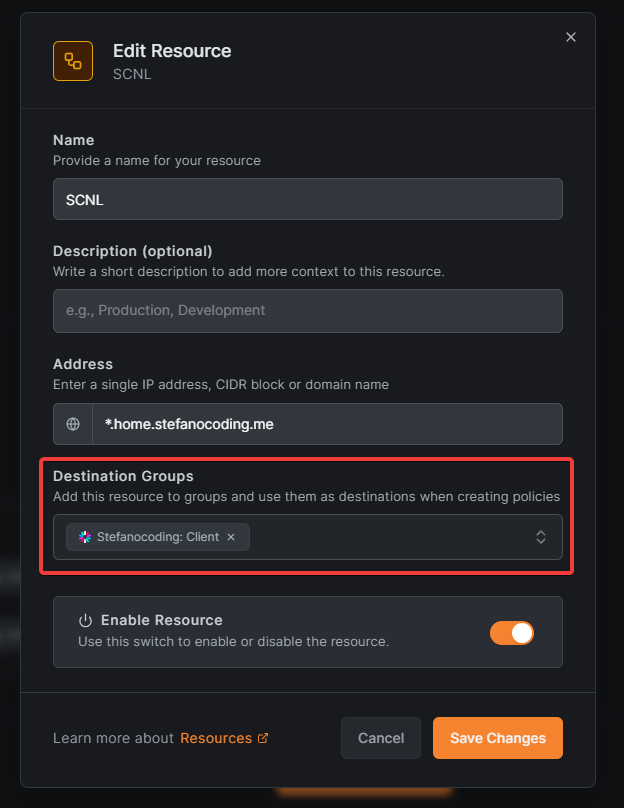
And put that group in the ACL.
Current public network feature, you setup the record like so:
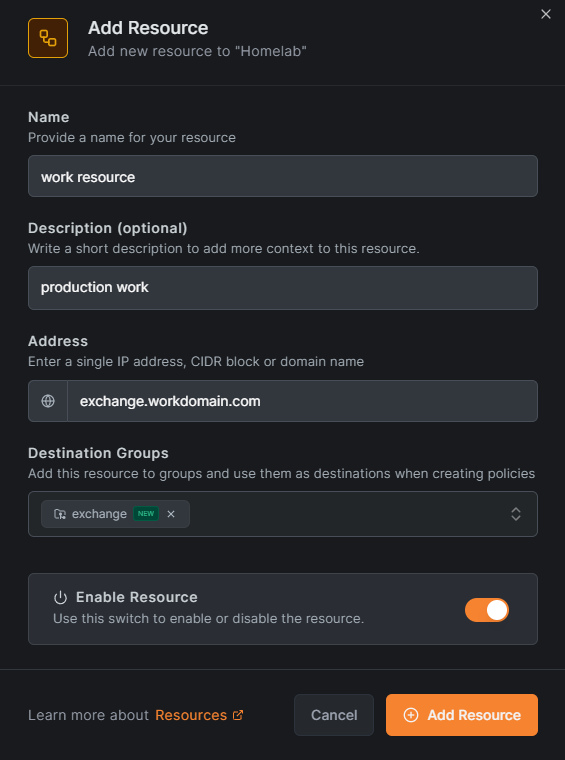
(And probably an ACL with the exchange group)
Then give everyone who needs to access exchange the exchange group. And they can get the domain, assuming there is a custom record, hosts file or similair to reach the machine/application in question. (There needs to be ANY form of reach from one server to the other for that to work, like an open firewall between those servers)
@Xeravax again thanks for taking the time with a detailed explanation!
So I have something similar at home:
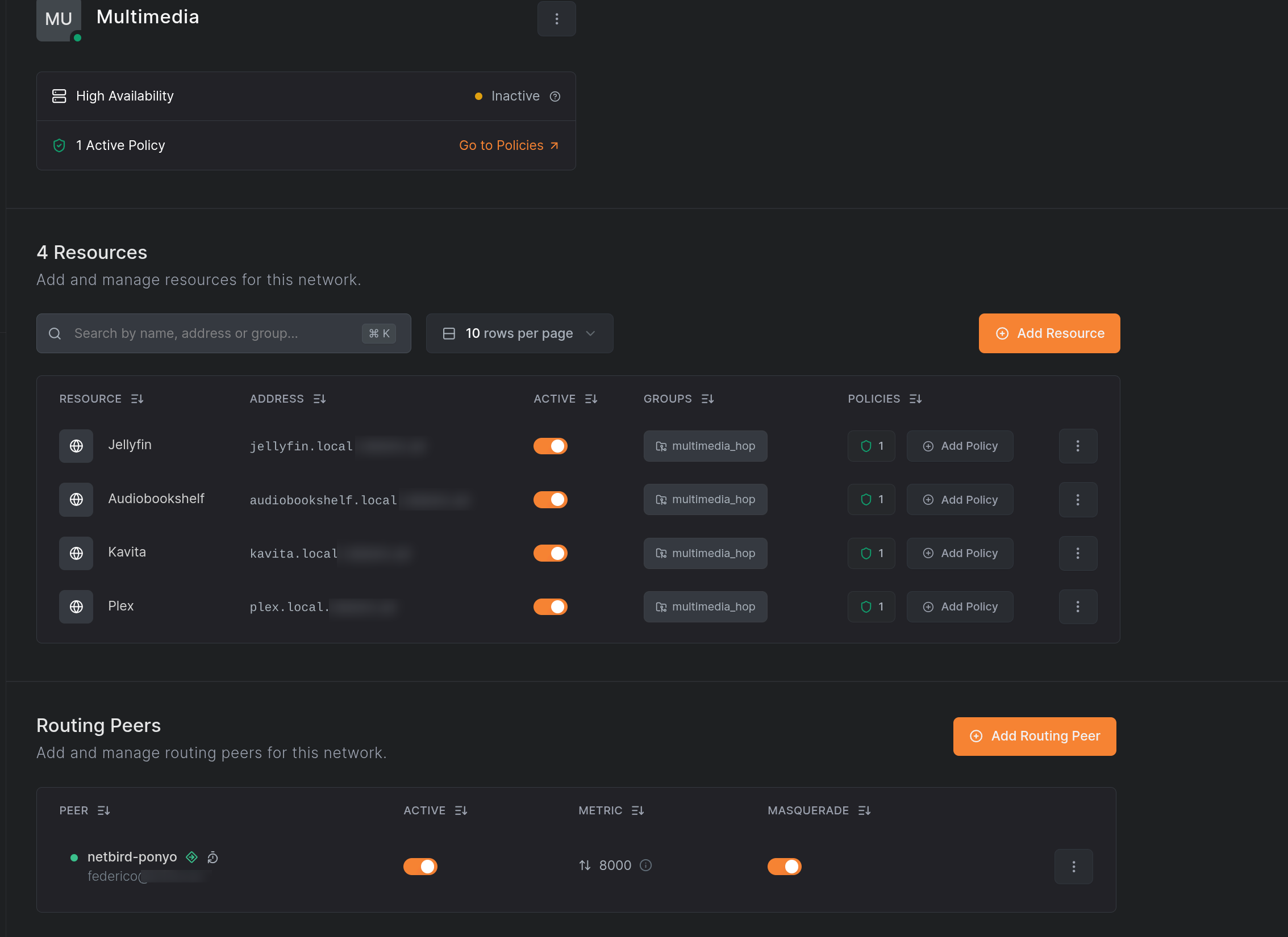
I have tried many things here. Specially with the distribution groups and policies. There is something really strange going on there.
These are the rules. there are many unabled, I am playing with them
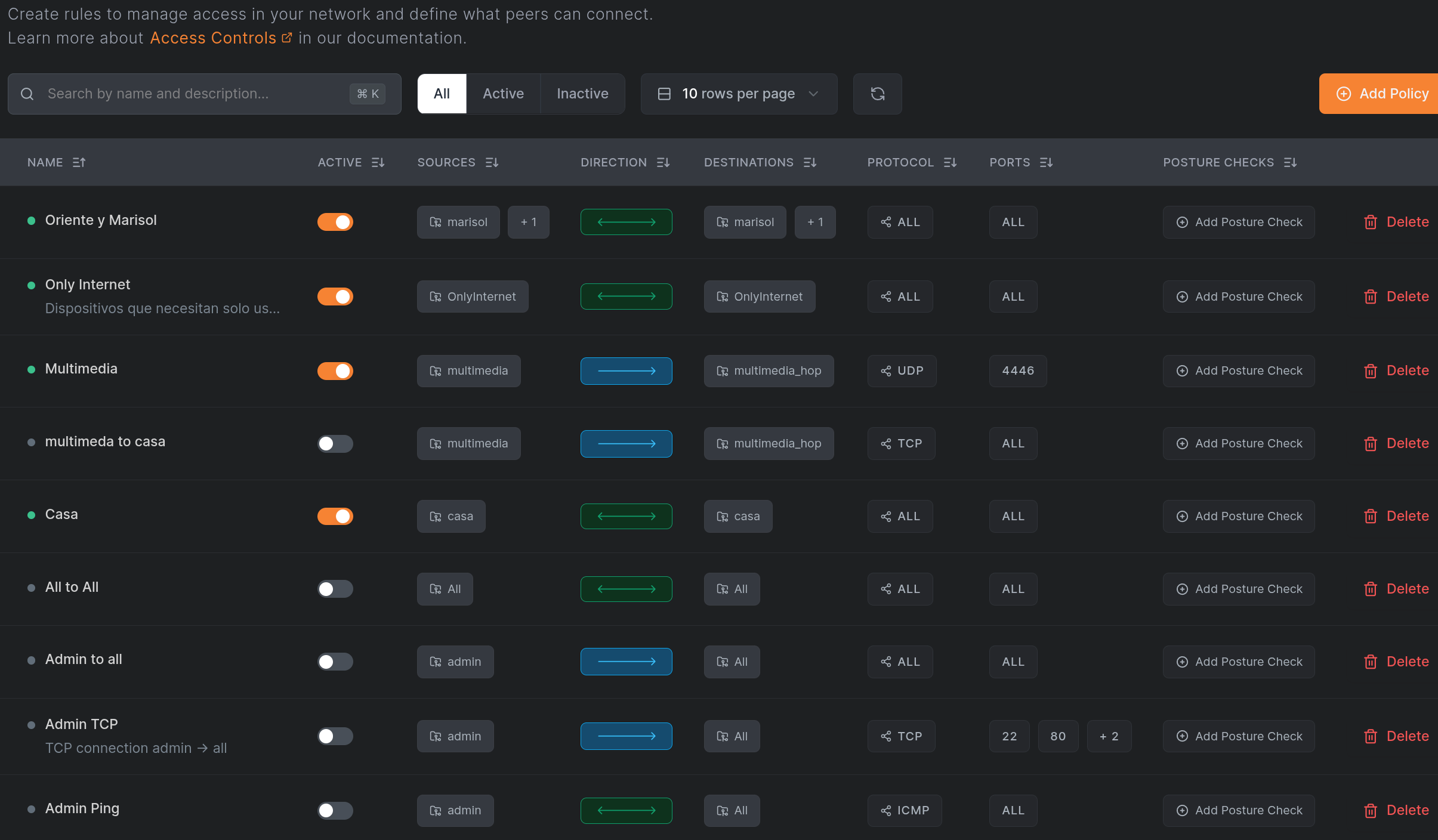
The one that applies here is Multimedia, that has the destination matching the network distribution group. (multimedia_hop)
The node above in next picture is just a VM that I use to permanent connect my LAN, that only contains a plain Linux instance running inside my LAN. That peer belongs to group multimedia_hop.
The node bellow is the one with only multimedia group assigned. That’d be just one of these external users I was talking before.
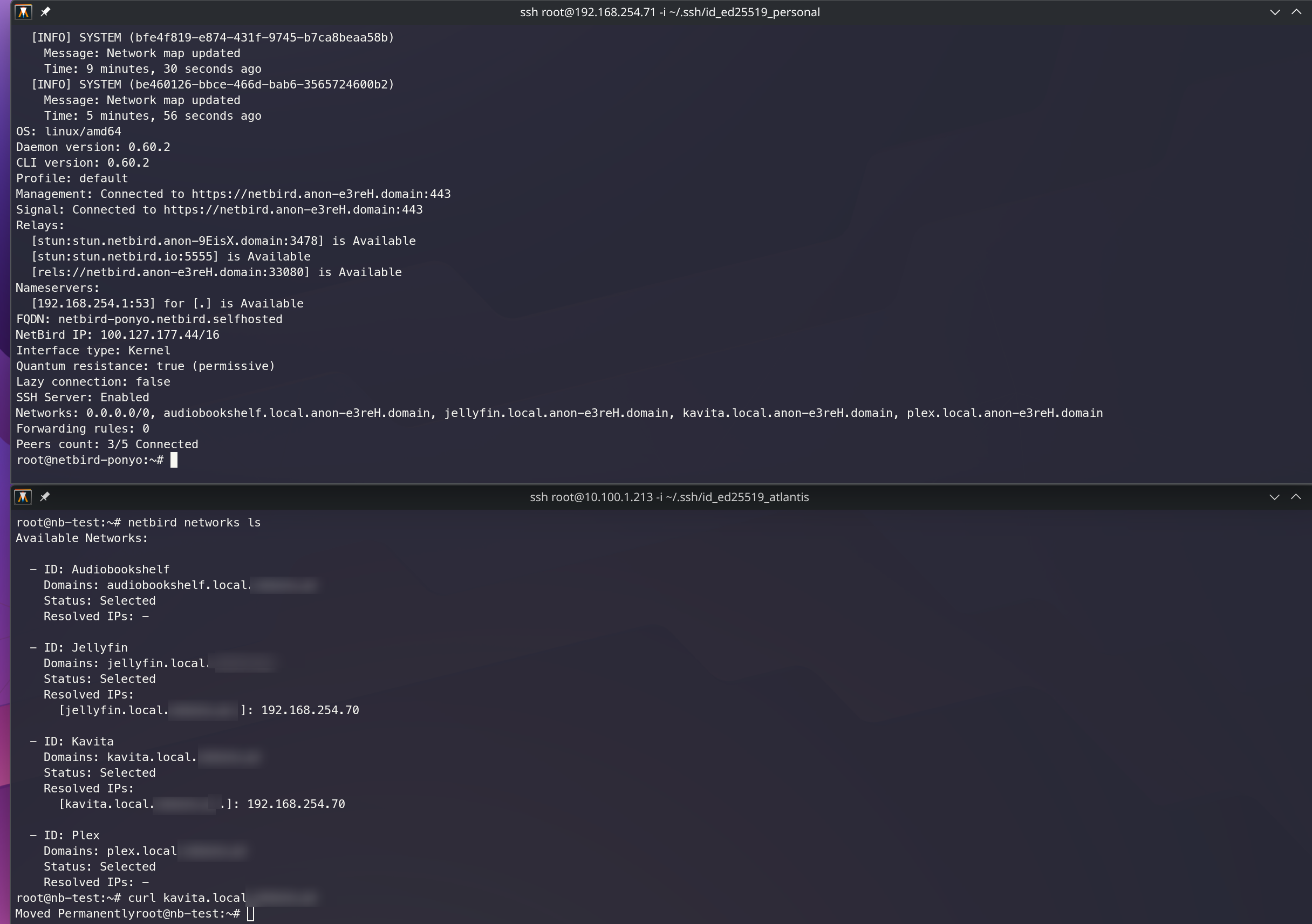
So this is quite working as I want, really, but policies do not make any sense here.
First all, if you add a destination group in network’s resources, you are forced to add a policy with that group as destination, otherwise those entries in the network list command don’t come up. Even if you have an all to all enabled, it requires you to add at least one rule with that.
Secondly, it requires to add such a rule, but it can be ANYTHING. Here is why I said it must be a bug or something. If look in my Multimedia policy, it is UDP port 4446. Can be anything. Tried any stuff in there. The rule is just needed to unlock the network URLs. That is a bug a guess?
Thirdly, my multimedia user is not even in the distribution group. It belong to the multimedia group, but since there is a rule linking both groups it gets the URLs. That is not expected neither.
Then the behaviour is good. My user node only can query for those 4 URLs from the hop node. Any other returns in error. That is good.
And then the hop node acts are router peer. That is good too. As can be seen in the last command a curl to kavita. The message is fine, since it tries to get to port 80 instead 443 that is the one configured. So it reaches the traefik in the server.
There were many other weird things during my testing. As I said, the more I went deep, the more issues I found.
And about the work setup, I still don’t see how those routing peers would resolve this new domains. That is the missing bit in this distributed schema. I mean the routing peer should be the server giving the resource. That is the easiest probably here.
Let’s say we have server-A that provides service-a.mydomain.com. The DNS record is currently delivered by CloudFlare. I could remove it from there, or use a new one for the new setup, does not affect. Then I can add a Netbird network, add a domain resource and add server-A as the peer. But server-A needs still to resolve that DNS query, isn’t it?. Configuring the hosts file? Something like that? (trying to keep it simple)
I was hoping Netbird took care of this. In this distributed environment I am struggling to find a good solution to adopt.