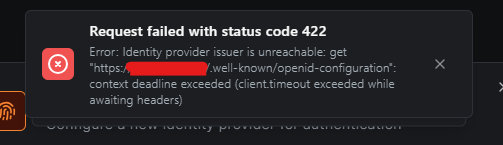
Describe the problem
I followed the guide to add Pocket-ID as a OIDC provider to my self hosted netbird instance on a vServer.
After setting up Pocket-ID localy on my TrueNAS, and filling out everything in NetBird to add Pocket-ID as a identity provider, I get the following error when hitting “Add Provider”
To Reproduce
Steps to reproduce the behavior:
- Follow this guide: PocketID with NetBird Self-Hosted - NetBird Docs
- Problem appears unter Step 2 No. 5.
Expected behavior
Adding Pocket-ID as OIDC
Are you using NetBird Cloud?
Self-host NetBird’s control plane.
NetBird version
0.66.2
This seems to be a connection issue, check if you are able to ping from your netbird machine to your PocketID.
Pocked-ID is running on my TrueNAS with also the NeBird-App on it.
The truenas client ist visable and connected in the netbird dashboard,
but I can’t ping it for another client with netbird on it.
Even with the Default Policy All ↔ All.
Your explaination here is confusing me a little bit, most setups have netbird setup on an remote machine outside of the network. ALlowing Netbird and PocketID to communicate. In this case, Netbird cannot reach your Truenas/PocketID as it needs this for the openid-configfuration file
Sorry for the confusions, I have the NetBird self hosted on a external VPS with a puplic IP.
Here at home I have a NetBird-Client on my PC, my laptop and on my TrueNAS running.
All Peers are listed under
https://netbird.mydomain.com/peers
and have the green dot.
But I can’t ping the netbird IP of my truenas from my PC.
The local IP of the NAS I can ping from my PC.
So just going off-of assumptions here, if I had to guess. PocketID is behind your network, correct? Can Netbird connect from the external VPS to your home network TO the PocketID? Or are you trying to have PocketID authenticate internally through the netbird network itself?
Hi Xeravax,
thanks for the answers, I have PocketID running as a TrueNAS-app in a docker container, just like the NetBird-app. Do I need a NetBird client on the VPS to get PocketID as a OIDC in NetBird?
Yes, because NetBird’s management UI needs to be able to reach PocketID directly.
Should this be done with the Command-line installation:
curl -fsSL https://pkgs.netbird.io/install.sh | sh
Or should the
services:
  netbird-client:
be added to the docker-compose.yaml from the netbird-server?
Or is it the better solution to install PocketID on the VPS via docker-compose? But properly I need the netbird peer on the netbird-server for the proxy-feature!?
Either get a secondary vps, or configure pocketid to run with traefik instead of nginx/other on the same machine as netbird management.
Thanks for the help, I installed a NetBird-Client on my NetBird-VPS and added a policie to allow TCP port 80 and 443 to my TrueNAS with PockedID on it. Now it is working.